
Il software è il cervello del tuo computer - tutto...
 Informatica976 views·Updated Jun 15, 2026·3 pages
Software: Tipi e Utilità

yufiii@h.y.a.

1 / 3
1
of 3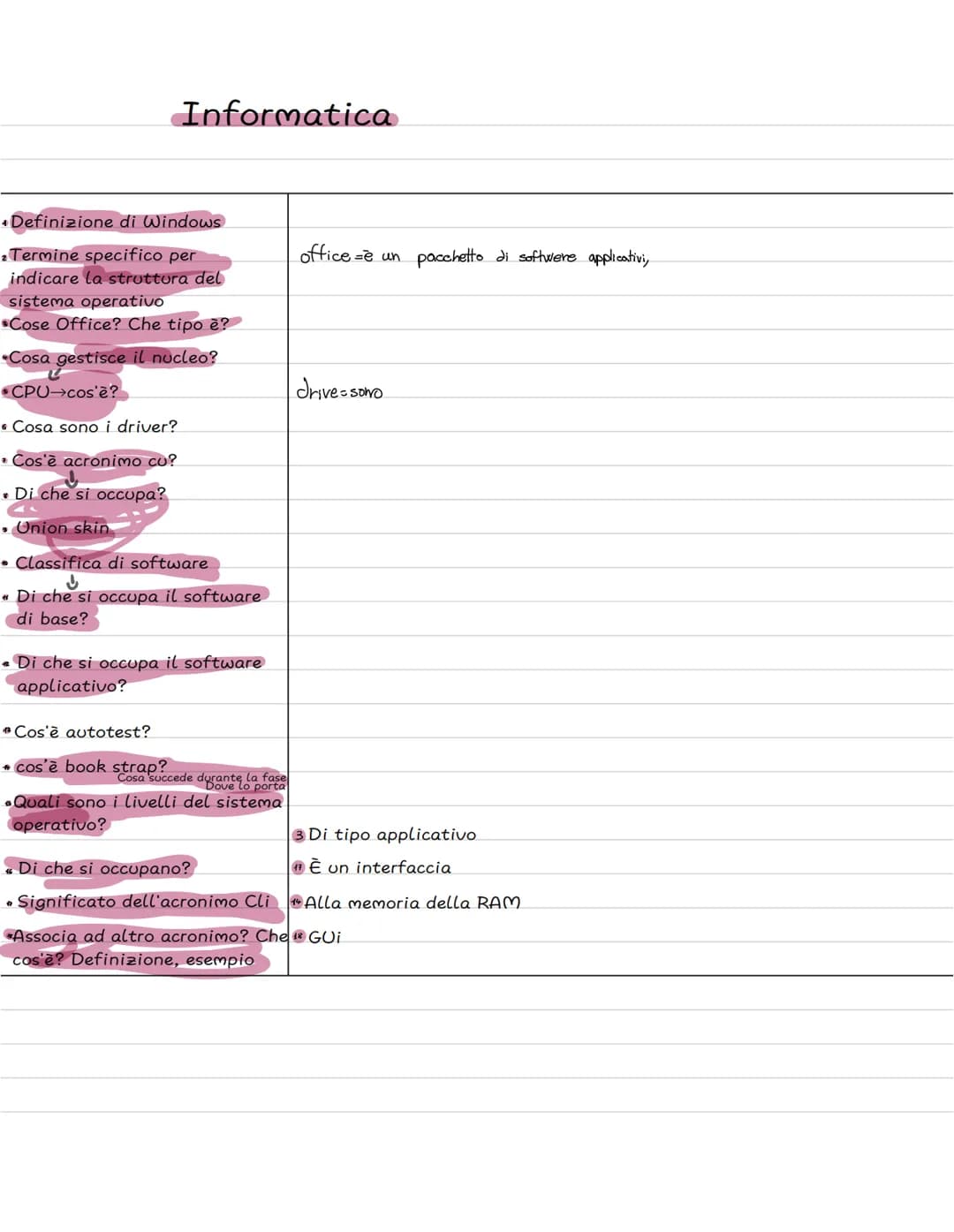
Informatica e Sistema Operativo Windows
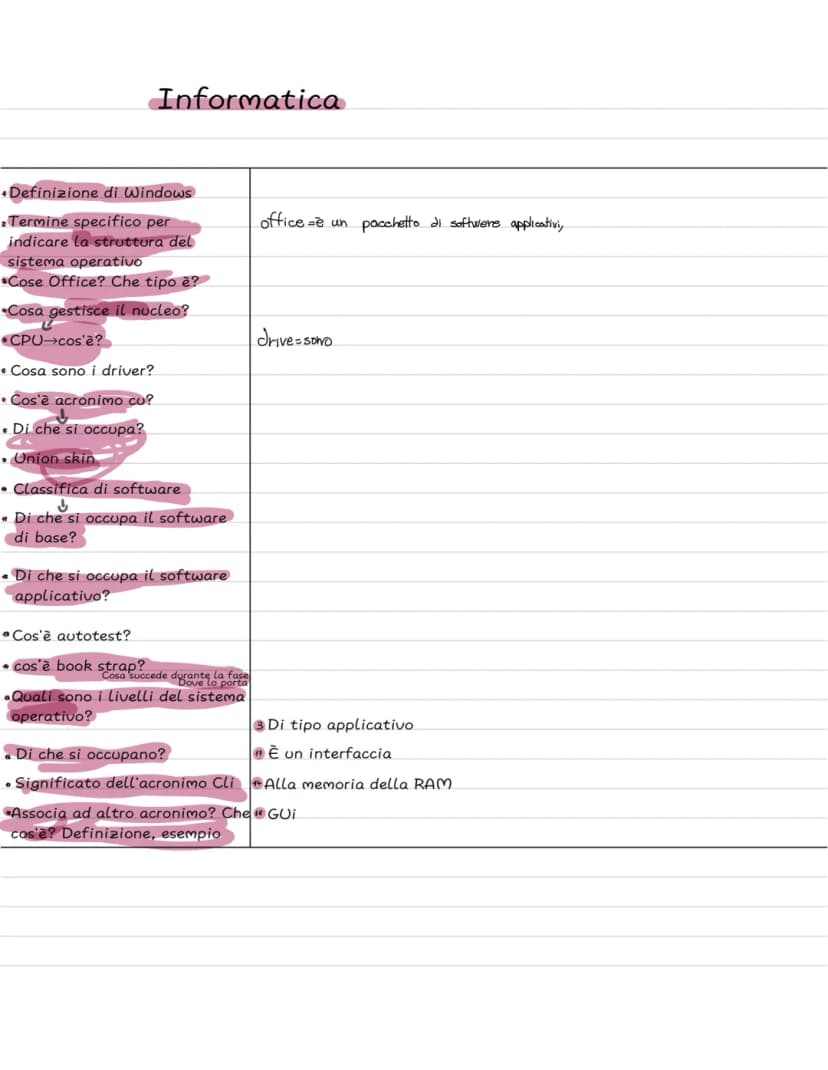
Hai mai pensato a cosa succede quando accendi il computer? Windows non è solo un nome - significa letteralmente "finestre" perché ti permette di usare più programmi contemporaneamente, ognuno nella sua finestra separata.
Office è un pacchetto di software applicativi - cioè un insieme di programmi come Word, Excel e PowerPoint che usi per fare i compiti o creare presentazioni. Questi programmi hanno bisogno di un sistema operativo per funzionare.
Per far girare tutto questo, il tuo computer deve essere abbastanza potente: serve una CPU veloce, un disco fisso capiente e molta memoria RAM. Senza questi componenti, il sistema non riuscirebbe a gestire tutte le operazioni che fai ogni giorno.
💡 Curiosità: Ogni volta che apri una nuova finestra su Windows, stai sfruttando la capacità del sistema di gestire più processi insieme!
2
of 3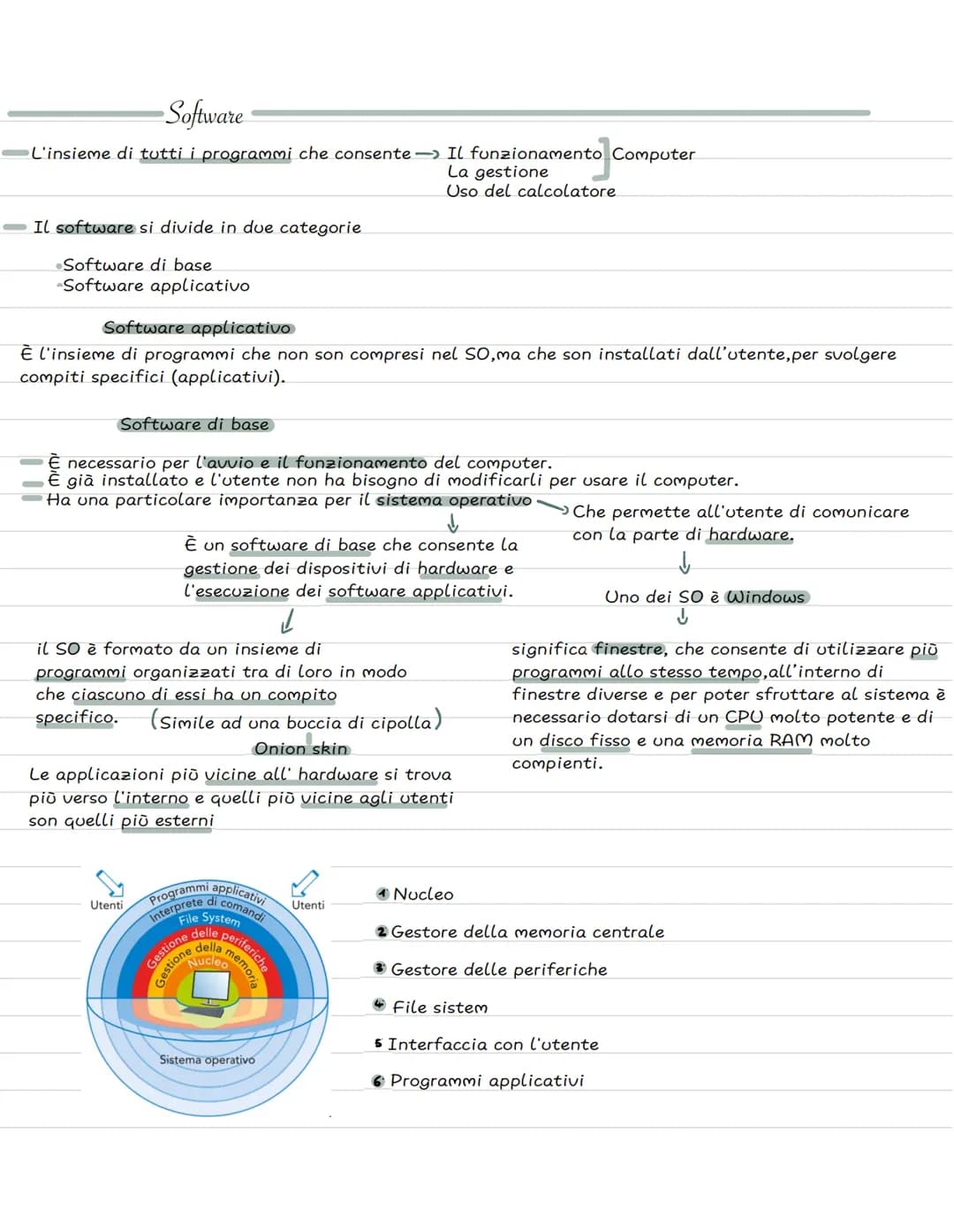
Software: La Base di Tutto
Il software è l'insieme di tutti i programmi che fanno funzionare il tuo computer - senza di esso, l'hardware sarebbe solo un pezzo di metallo inutile! Pensa al software come al sistema nervoso del PC.
Esistono due tipi principali di software. Il software di base è quello già installato quando compri il computer - include il sistema operativo che permette di comunicare con l'hardware. Il software applicativo invece comprende tutti i programmi che installi tu per compiti specifici, come i giochi o i programmi di grafica.
Il sistema operativo funziona come una "buccia di cipolla" (onion skin) - ha diversi livelli che lavorano insieme. I programmi più vicini all'hardware stanno al centro, mentre quelli che usi direttamente sono più esterni.
La struttura ha sei livelli principali: dal nucleo interno fino ai programmi applicativi esterni. Ogni livello ha un compito specifico e comunica con gli altri per far funzionare tutto perfettamente.
🎯 Ricorda: Il sistema operativo è come un direttore d'orchestra - coordina tutti i componenti perché suonino in armonia!
3
of 3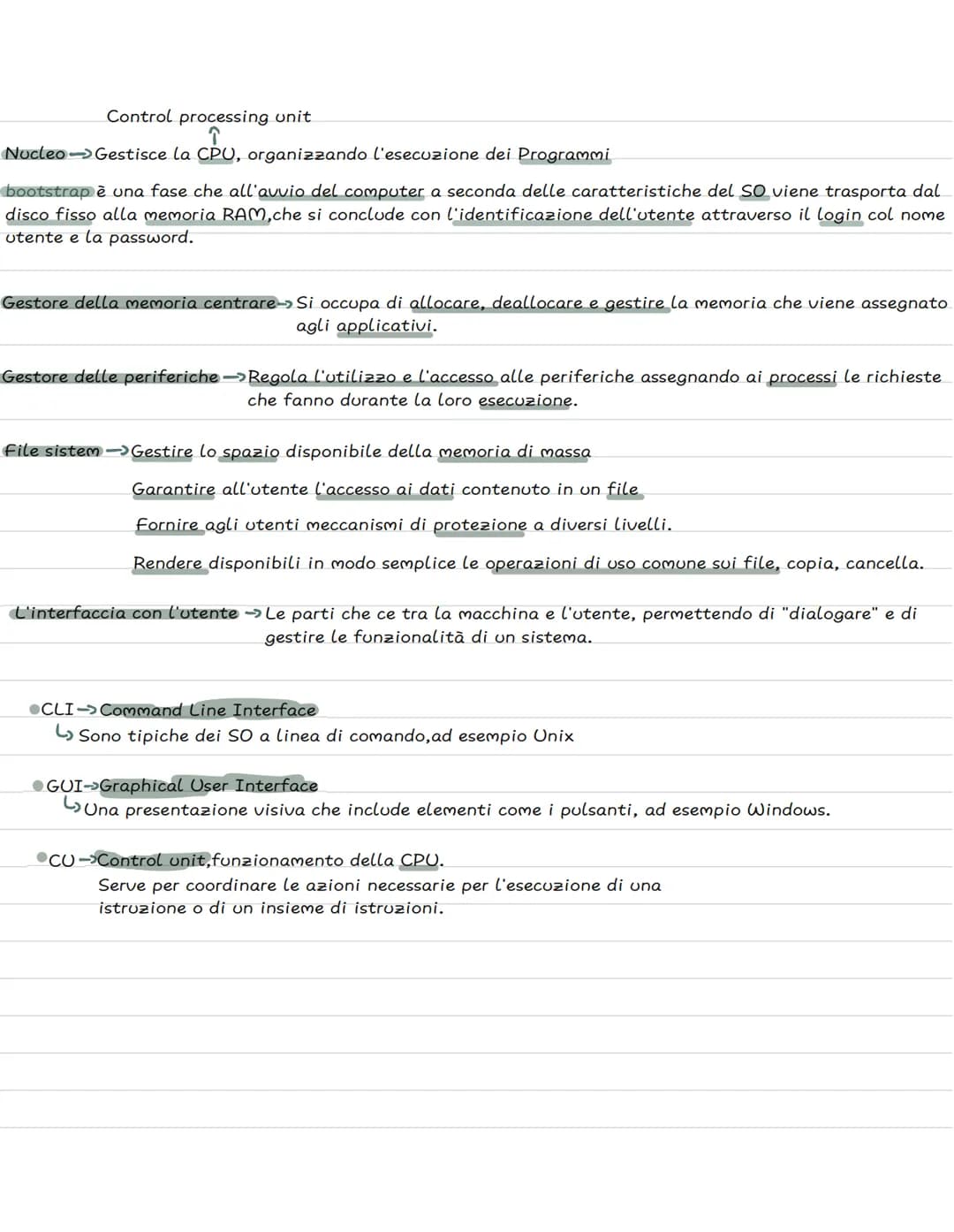
I Componenti del Sistema Operativo
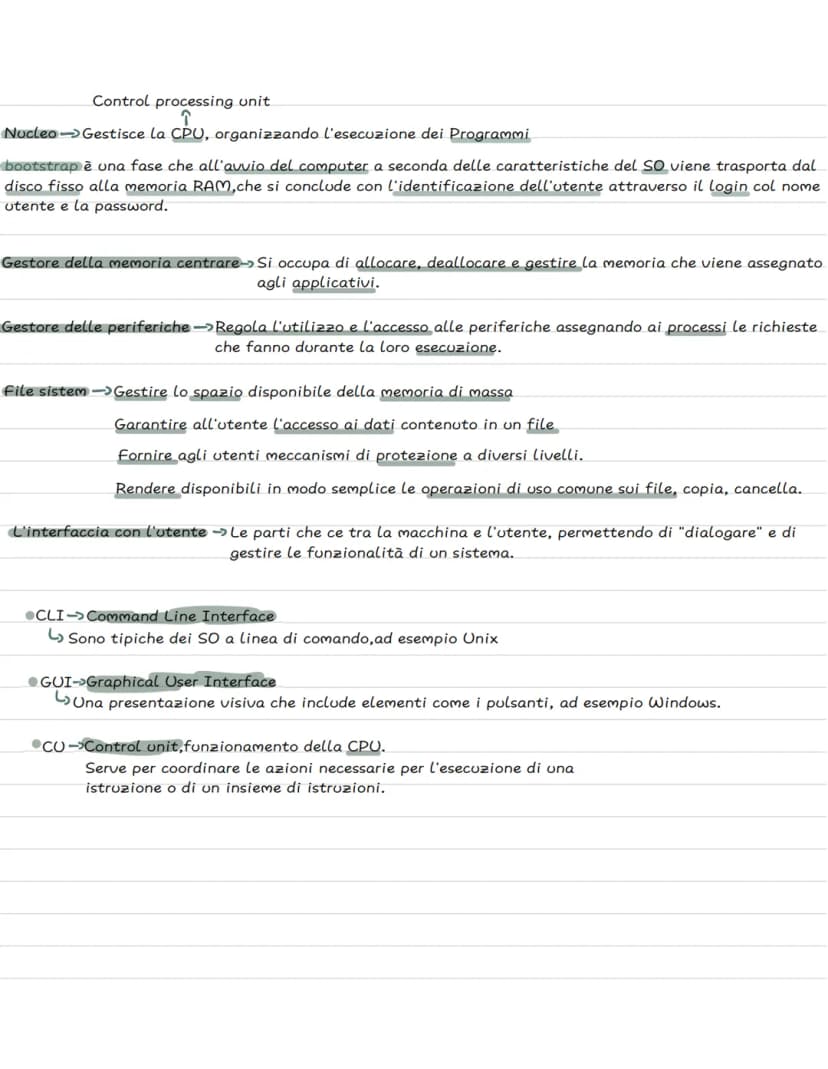
La CPU (Control Processing Unit) è il cervello del computer, e il nucleo del sistema operativo la gestisce organizzando l'esecuzione di tutti i programmi. È come un vigile del traffico che decide chi può passare e quando.
Il bootstrap è la fase di avvio - quando accendi il PC, il sistema operativo viene caricato dal disco fisso alla memoria RAM. Questa fase si conclude quando inserisci username e password per fare il login.
Ci sono poi altri componenti fondamentali: il gestore della memoria assegna spazio ai programmi, il gestore delle periferiche controlla mouse e tastiera, e il file system organizza tutti i tuoi documenti e file.
L'interfaccia utente è il ponte tra te e la macchina. Può essere CLI (Command Line Interface) dove scrivi comandi di testo, oppure GUI (Graphical User Interface) con bottoni e icone come in Windows. La CU (Control Unit) coordina tutte le operazioni della CPU.
⚡ Trucco: Ogni volta che salvi un file o apri un programma, tutti questi componenti lavorano insieme in una frazione di secondo!
We thought you’d never ask...
What is the Knowunity AI companion?
Our AI companion is specifically built for the needs of students. Based on the millions of content pieces we have on the platform we can provide truly meaningful and relevant answers to students. But its not only about answers, the companion is even more about guiding students through their daily learning challenges, with personalised study plans, quizzes or content pieces in the chat and 100% personalisation based on the students skills and developments.
Where can I download the Knowunity app?
You can download the app in the Google Play Store and in the Apple App Store.
Is Knowunity really free of charge?
That's right! Enjoy free access to study content, connect with fellow students, and get instant help – all at your fingertips.
Similar Content
Most popular content: sistema informatico
9InformaticaInformatica 1
Primi argomenti di informatica della prima superiore, Architettura di VON NEUMANN, Hardware software, Il case e la scheda madre, Periferiche e schede e porte di comunicazione, l’unità centrale di elaborazione e la memoria centrale, la memoria RAM…..
1ªl69028
InformaticaIntroduzione all’Informatica
Questa è una presentazione sulle basi dell’informatica
1ªl68015
InformaticaLa struttura del Computer
Powerpoint sulla struttura del computer.
3ªl4,364270
InformaticaI sistemi operativi
I sistemi operativi.
1ªl1,37733
InformaticaIL SISTEMA OPERATIVO
Presentazione riguardo il sistema operativo, le sue competenti, la storia del computer, i virus, i browsers e tanto altro
1ªl8,818241
InformaticaSoftware e Hardware
Informatica
1ªl1,96032
InformaticaHardware & software
Riassunto hardware e software
1ªl4729
InformaticaCos'è L'informatica, software e hardware ~ riassunto
ecco a voi un riassunto su Cos'è L'informatica, l'algoritmo, software e hardware, le memorie ecc...
1ªl18,4641,458
InformaticaSistemi di Architettura e Von Neumann
Sistemi di elaborazione digitale e il computer
2ªl7696
Most popular content in Informatica
9S
InformaticaStranger Things
Quanto Ne Sai Sulla Fantastica Serie Netflix Stranger Things??
1ªm6309
InformaticaSegnali integrativi
Appunti patente
3ªl2,51158
InformaticaDiagrammi di flusso
Appunti per ripasso dei diagrammi di flusso (flowchart); Introduzione ai blocchi, condizione e iterazioni (WHILE e DO WHILE);
1ªl2,27840
InformaticaProgrammazione in C
Appunti chiave per programmare in C
1ªl1,99570
Informaticail romanico
elementi del romantico
2ªm2,943100
InformaticaEXCEL
riferimenti, funzioni (SE, CONTA.SE, CONFRONTA, CERCA.VERT, SOMMA.SE, MAX e MIN, E), copia e incolla, riempimento automatico, subtotali
1ªl2,87384
InformaticaComposti chimici inorganici
Composti chimici inorganici + nomenclatura
1ªl1,27746
InformaticaInformatica 1
Primi argomenti di informatica della prima superiore, Architettura di VON NEUMANN, Hardware software, Il case e la scheda madre, Periferiche e schede e porte di comunicazione, l’unità centrale di elaborazione e la memoria centrale, la memoria RAM…..
1ªl69028
Informaticareti informatiche
le reti informatiche, cosa sono, come funzionano e le sue caratteristiche
5ªl3,07662
Most popular content
9 Italiano
Riassunto patente B
Riassunto patente B - appunti presi a lezione
5ªl29,242943
 Altro
AltroTeoria patente b
Tutti gli argomenti per la patente
1ªl21,138685
 Ed. civ.
Teoria patente di guida B: Segnali stradali
Segnali stradali di pericolo, luminosi, di prescrizione, di indicazione, temporanei, complementari, pannelli integrativi, segnaletica orizzontale, segnalazioni agenti del traffico, distanza di visibilità per l‘arresto, minima di sicurezza.
5ªl40,0421,645
 Filosofia
Aristotele
Aristotele: vita, metafisica, fisica, etica e politica, retorica e poetica
3ªl7,623216
ItalianoI promessi sposi
Riassunti completi di tutti i 38 capitoli dei Promessi sposi.
2ªl14,090314
AltroPATENTE
schemi per esame teorico della patente
Università22,067756
S
ItalianoSintesi finale di Analisi logica
Esercitazione completa di analisi logica su frasi articolate per consolidare la conoscenza di tutti i complementi.
3ªm5,5290
P
 Inglese
Present Simple vs Present Continuous
Develop the ability to choose correctly between the Present Simple for habits and the Present Continuous for ongoing actions.
3ªm4,2120
G
ItalianoGabriele D'Annunzio e l'Estetismo
Domande sull'ideale del superuomo, il panismo e la concezione dell'arte come valore assoluto in D'Annunzio.
4ªl2,6740
Can't find what you're looking for? Explore other subjects.
Students love us — and so will you.
4.6/5App Store
4.7/5Google Play
The app is very easy to use and well designed. I have found everything I was looking for so far and have been able to learn a lot from the presentations! I will definitely use the app for a class assignment! And of course it also helps a lot as an inspiration.
Stefan SiOS user
This app is really great. There are so many study notes and help [...]. My problem subject is French, for example, and the app has so many options for help. Thanks to this app, I have improved my French. I would recommend it to anyone.
Samantha KlichAndroid user
Wow, I am really amazed. I just tried the app because I've seen it advertised many times and was absolutely stunned. This app is THE HELP you want for school and above all, it offers so many things, such as workouts and fact sheets, which have been VERY helpful to me personally.
AnnaiOS user
Informatica976 views·Updated Jun 15, 2026·3 pagesSoftware: Tipi e Utilità
yufiii@h.y.a.
Il software è il cervello del tuo computer - tutto quello che rende possibile usare i programmi che ami ogni giorno. Scopriamo insieme come funziona il sistema operativo Windows e quali sono i componenti che permettono al tuo PC di...
1
of 3
Sign up to see the content. It's free!
- Access to all documents
- Improve your grades
- Join milions of students
Informatica e Sistema Operativo Windows
Hai mai pensato a cosa succede quando accendi il computer? Windows non è solo un nome - significa letteralmente "finestre" perché ti permette di usare più programmi contemporaneamente, ognuno nella sua finestra separata.
Office è un pacchetto di software applicativi - cioè un insieme di programmi come Word, Excel e PowerPoint che usi per fare i compiti o creare presentazioni. Questi programmi hanno bisogno di un sistema operativo per funzionare.
Per far girare tutto questo, il tuo computer deve essere abbastanza potente: serve una CPU veloce, un disco fisso capiente e molta memoria RAM. Senza questi componenti, il sistema non riuscirebbe a gestire tutte le operazioni che fai ogni giorno.
💡 Curiosità: Ogni volta che apri una nuova finestra su Windows, stai sfruttando la capacità del sistema di gestire più processi insieme!
2
of 3Sign up to see the content. It's free!
- Access to all documents
- Improve your grades
- Join milions of students
Software: La Base di Tutto
Il software è l'insieme di tutti i programmi che fanno funzionare il tuo computer - senza di esso, l'hardware sarebbe solo un pezzo di metallo inutile! Pensa al software come al sistema nervoso del PC.
Esistono due tipi principali di software. Il software di base è quello già installato quando compri il computer - include il sistema operativo che permette di comunicare con l'hardware. Il software applicativo invece comprende tutti i programmi che installi tu per compiti specifici, come i giochi o i programmi di grafica.
Il sistema operativo funziona come una "buccia di cipolla" (onion skin) - ha diversi livelli che lavorano insieme. I programmi più vicini all'hardware stanno al centro, mentre quelli che usi direttamente sono più esterni.
La struttura ha sei livelli principali: dal nucleo interno fino ai programmi applicativi esterni. Ogni livello ha un compito specifico e comunica con gli altri per far funzionare tutto perfettamente.
🎯 Ricorda: Il sistema operativo è come un direttore d'orchestra - coordina tutti i componenti perché suonino in armonia!
3
of 3Sign up to see the content. It's free!
- Access to all documents
- Improve your grades
- Join milions of students
I Componenti del Sistema Operativo
La CPU (Control Processing Unit) è il cervello del computer, e il nucleo del sistema operativo la gestisce organizzando l'esecuzione di tutti i programmi. È come un vigile del traffico che decide chi può passare e quando.
Il bootstrap è la fase di avvio - quando accendi il PC, il sistema operativo viene caricato dal disco fisso alla memoria RAM. Questa fase si conclude quando inserisci username e password per fare il login.
Ci sono poi altri componenti fondamentali: il gestore della memoria assegna spazio ai programmi, il gestore delle periferiche controlla mouse e tastiera, e il file system organizza tutti i tuoi documenti e file.
L'interfaccia utente è il ponte tra te e la macchina. Può essere CLI (Command Line Interface) dove scrivi comandi di testo, oppure GUI (Graphical User Interface) con bottoni e icone come in Windows. La CU (Control Unit) coordina tutte le operazioni della CPU.
⚡ Trucco: Ogni volta che salvi un file o apri un programma, tutti questi componenti lavorano insieme in una frazione di secondo!
We thought you’d never ask...
What is the Knowunity AI companion?
Our AI companion is specifically built for the needs of students. Based on the millions of content pieces we have on the platform we can provide truly meaningful and relevant answers to students. But its not only about answers, the companion is even more about guiding students through their daily learning challenges, with personalised study plans, quizzes or content pieces in the chat and 100% personalisation based on the students skills and developments.
Where can I download the Knowunity app?
You can download the app in the Google Play Store and in the Apple App Store.
Is Knowunity really free of charge?
That's right! Enjoy free access to study content, connect with fellow students, and get instant help – all at your fingertips.
Similar Content
Most popular content: sistema informatico
9InformaticaInformatica 1
Primi argomenti di informatica della prima superiore, Architettura di VON NEUMANN, Hardware software, Il case e la scheda madre, Periferiche e schede e porte di comunicazione, l’unità centrale di elaborazione e la memoria centrale, la memoria RAM…..
1ªl69028
InformaticaIntroduzione all’Informatica
Questa è una presentazione sulle basi dell’informatica
1ªl68015
InformaticaLa struttura del Computer
Powerpoint sulla struttura del computer.
3ªl4,364270
InformaticaI sistemi operativi
I sistemi operativi.
1ªl1,37733
InformaticaIL SISTEMA OPERATIVO
Presentazione riguardo il sistema operativo, le sue competenti, la storia del computer, i virus, i browsers e tanto altro
1ªl8,818241
InformaticaSoftware e Hardware
Informatica
1ªl1,96032
InformaticaHardware & software
Riassunto hardware e software
1ªl4729
InformaticaCos'è L'informatica, software e hardware ~ riassunto
ecco a voi un riassunto su Cos'è L'informatica, l'algoritmo, software e hardware, le memorie ecc...
1ªl18,4641,458
InformaticaSistemi di Architettura e Von Neumann
Sistemi di elaborazione digitale e il computer
2ªl7696
Most popular content in Informatica
9S
InformaticaStranger Things
Quanto Ne Sai Sulla Fantastica Serie Netflix Stranger Things??
1ªm6309
InformaticaSegnali integrativi
Appunti patente
3ªl2,51158
InformaticaDiagrammi di flusso
Appunti per ripasso dei diagrammi di flusso (flowchart); Introduzione ai blocchi, condizione e iterazioni (WHILE e DO WHILE);
1ªl2,27840
InformaticaProgrammazione in C
Appunti chiave per programmare in C
1ªl1,99570
Informaticail romanico
elementi del romantico
2ªm2,943100
InformaticaEXCEL
riferimenti, funzioni (SE, CONTA.SE, CONFRONTA, CERCA.VERT, SOMMA.SE, MAX e MIN, E), copia e incolla, riempimento automatico, subtotali
1ªl2,87384
InformaticaComposti chimici inorganici
Composti chimici inorganici + nomenclatura
1ªl1,27746
InformaticaInformatica 1
Primi argomenti di informatica della prima superiore, Architettura di VON NEUMANN, Hardware software, Il case e la scheda madre, Periferiche e schede e porte di comunicazione, l’unità centrale di elaborazione e la memoria centrale, la memoria RAM…..
1ªl69028
Informaticareti informatiche
le reti informatiche, cosa sono, come funzionano e le sue caratteristiche
5ªl3,07662
Most popular content
9ItalianoRiassunto patente B
Riassunto patente B - appunti presi a lezione
5ªl29,242943
AltroTeoria patente b
Tutti gli argomenti per la patente
1ªl21,138685
Ed. civ.Teoria patente di guida B: Segnali stradali
Segnali stradali di pericolo, luminosi, di prescrizione, di indicazione, temporanei, complementari, pannelli integrativi, segnaletica orizzontale, segnalazioni agenti del traffico, distanza di visibilità per l‘arresto, minima di sicurezza.
5ªl40,0421,645
FilosofiaAristotele
Aristotele: vita, metafisica, fisica, etica e politica, retorica e poetica
3ªl7,623216
ItalianoI promessi sposi
Riassunti completi di tutti i 38 capitoli dei Promessi sposi.
2ªl14,090314
AltroPATENTE
schemi per esame teorico della patente
Università22,067756
S
ItalianoSintesi finale di Analisi logica
Esercitazione completa di analisi logica su frasi articolate per consolidare la conoscenza di tutti i complementi.
3ªm5,5290
P
InglesePresent Simple vs Present Continuous
Develop the ability to choose correctly between the Present Simple for habits and the Present Continuous for ongoing actions.
3ªm4,2120
G
ItalianoGabriele D'Annunzio e l'Estetismo
Domande sull'ideale del superuomo, il panismo e la concezione dell'arte come valore assoluto in D'Annunzio.
4ªl2,6740
Can't find what you're looking for? Explore other subjects.
Students love us — and so will you.
4.6/5App Store
4.7/5Google Play
The app is very easy to use and well designed. I have found everything I was looking for so far and have been able to learn a lot from the presentations! I will definitely use the app for a class assignment! And of course it also helps a lot as an inspiration.
Stefan SiOS user
This app is really great. There are so many study notes and help [...]. My problem subject is French, for example, and the app has so many options for help. Thanks to this app, I have improved my French. I would recommend it to anyone.
Samantha KlichAndroid user
Wow, I am really amazed. I just tried the app because I've seen it advertised many times and was absolutely stunned. This app is THE HELP you want for school and above all, it offers so many things, such as workouts and fact sheets, which have been VERY helpful to me personally.
AnnaiOS user