
L'evoluzione delle reti informatiche ha rivoluzionato il modo in cui...
 Informatica1,961 views·Updated Jun 16, 2026·5 pages
Reti Informatiche: Modelli Client/Server e Peer-to-Peer Spiegati Semplicemente

Valentina Crotti@valentina_crotti

1 / 5
1
of 5
Aspetti Evolutivi delle Reti e Modelli di Comunicazione
Oggi non parliamo più solo di informatica, ma di ICT - tutte quelle tecnologie che servono a conservare e trasmettere informazioni attraverso reti di computer. Da qui nasce la telematica, fusione perfetta tra telecomunicazioni e informatica.
Una rete è semplicemente un insieme di computer collegati tra loro per soddisfare le nostre esigenze quotidiane: condividere file, usare stampanti comuni, consultare database condivisi. Pensa a quando scarichi un file dal computer del tuo amico o stampi da una stampante di rete!
Esistono due modelli principali: Client/Server (dove alcuni computer fanno da "servitori" offrendo risorse) e Peer to Peer (dove tutti i computer sono sullo stesso livello). Nelle reti C/S la distinzione non è sempre netta - un computer può comportarsi da server per un servizio e da client per un altro.
Ricorda: La telematica è ovunque intorno a te - dal WiFi di casa ai social network!
2
of 5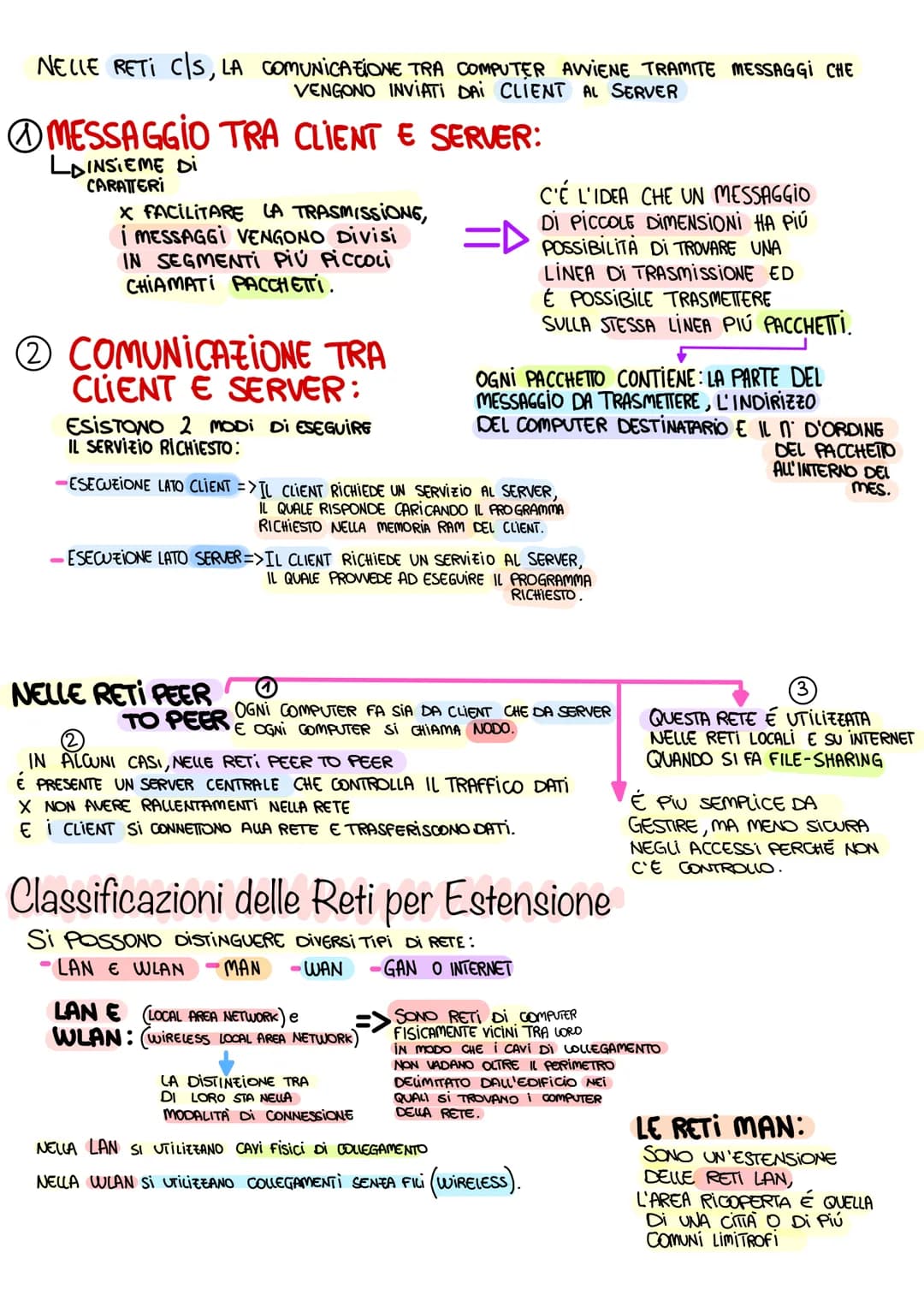
Comunicazione e Trasmissione Dati
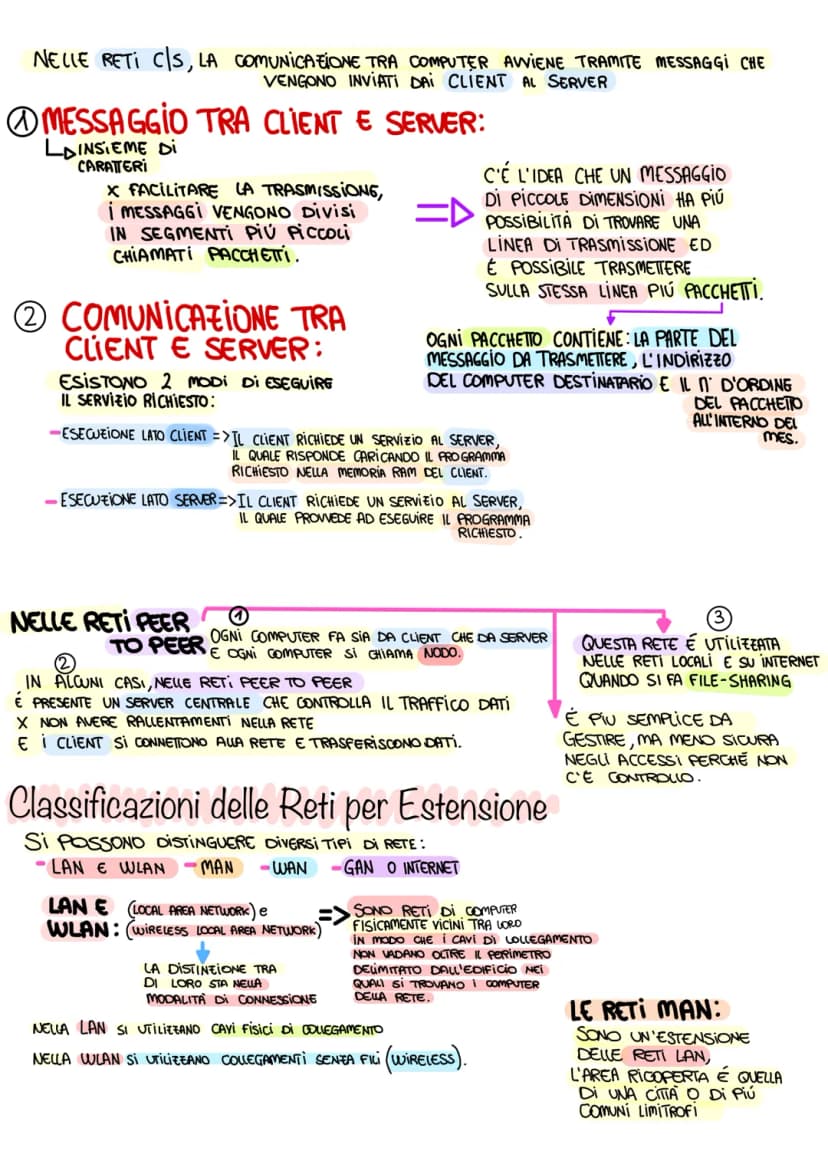
Nelle reti Client/Server, la comunicazione avviene tramite messaggi che viaggiano come pacchetti di caratteri. Per facilitare la trasmissione, questi messaggi vengono spezzettati in pacchetti più piccoli - immagina di spedire una lettera lunga dividendola in più buste numerate!
Ogni pacchetto contiene tre elementi fondamentali: la parte del messaggio, l'indirizzo del destinatario e il numero d'ordine. Esistono due modi per eseguire i servizi: esecuzione lato client (il programma viene caricato sul tuo computer) o esecuzione lato server (il programma gira sul server remoto).
Nelle reti Peer to Peer, ogni computer si chiama nodo e funziona sia da client che da server. A volte c'è un server centrale che controlla il traffico per evitare rallentamenti - come un vigile che regola il traffico in una strada trafficata.
Curiosità: Quando fai file-sharing stai usando una rete peer to peer!
3
of 5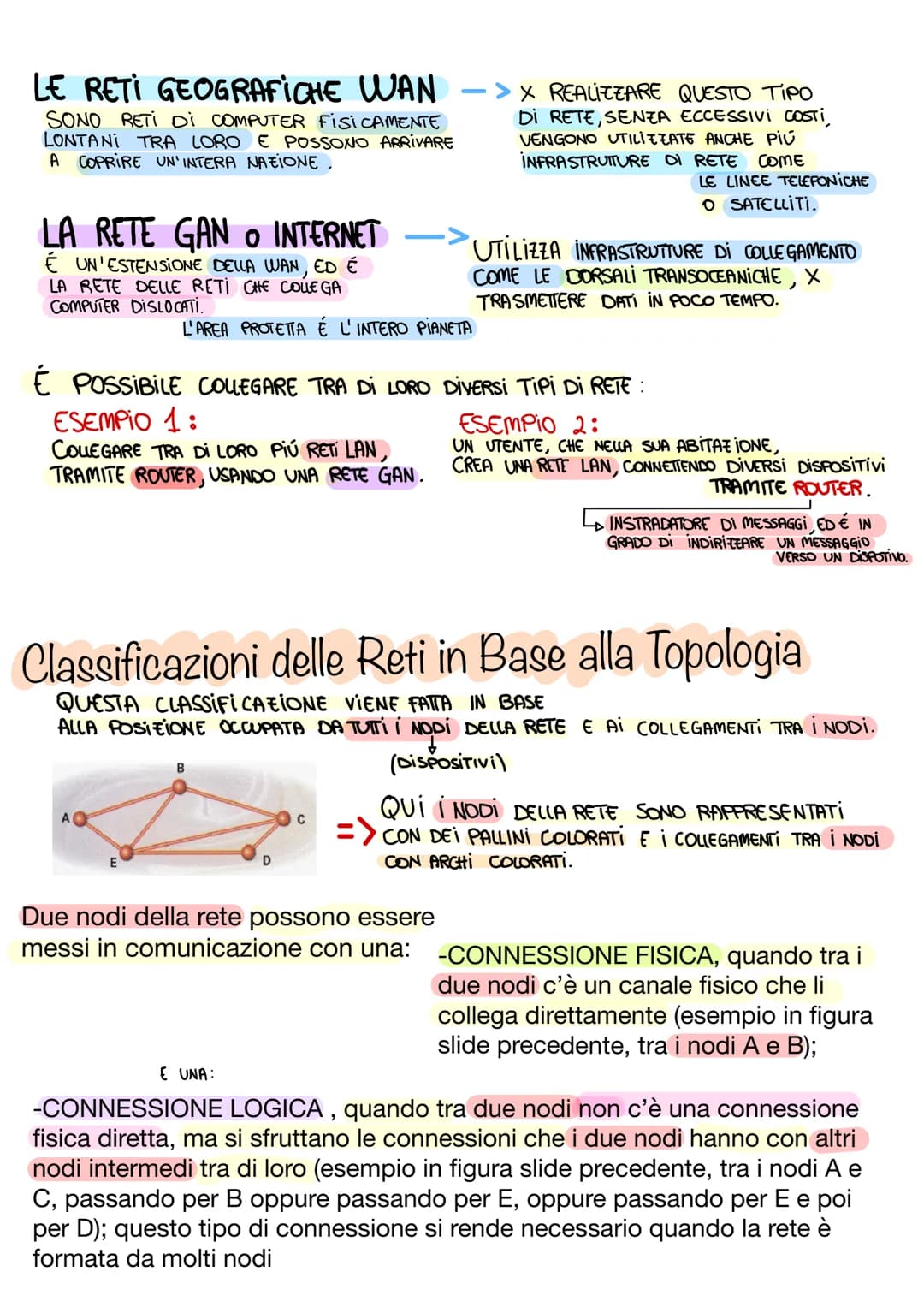
Classificazione delle Reti per Estensione
Le reti si classificano in base alla distanza che coprono. Le LAN (Local Area Network) e WLAN (Wireless LAN) sono reti locali - la differenza sta nei cavi fisici versus collegamenti wireless. Pensale come la rete di casa tua o della scuola.
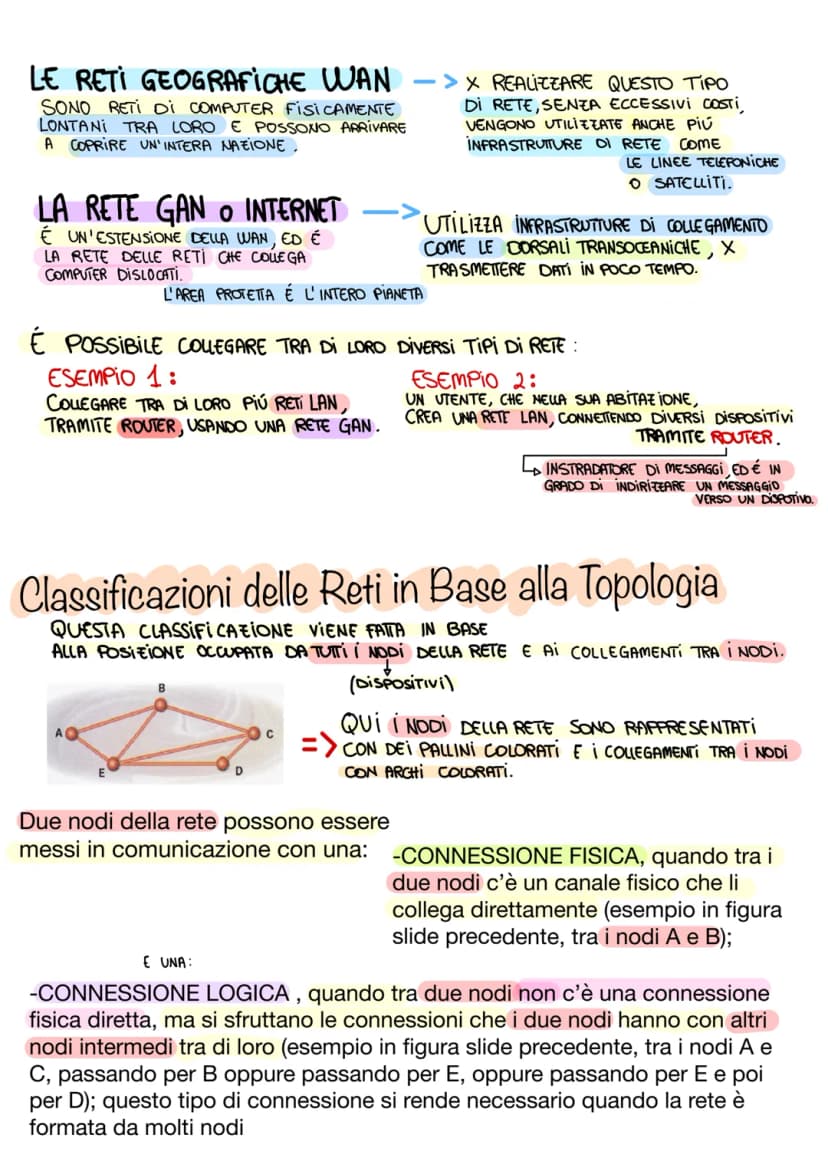
Le MAN (Metropolitan Area Network) coprono una città o più comuni limitrofi - come una rete che collega tutte le scuole di una provincia. Le WAN (Wide Area Network) arrivano a coprire intere nazioni, mentre Internet è la rete globale che connette tutto il pianeta.
Puoi collegare diversi tipi di rete tra loro usando i router - dispositivi che funzionano come "instradatori di messaggi". Per esempio, la tua LAN di casa si connette a Internet attraverso il router del tuo provider.
Pensa così: LAN = casa, MAN = città, WAN = nazione, Internet = mondo intero!
4
of 5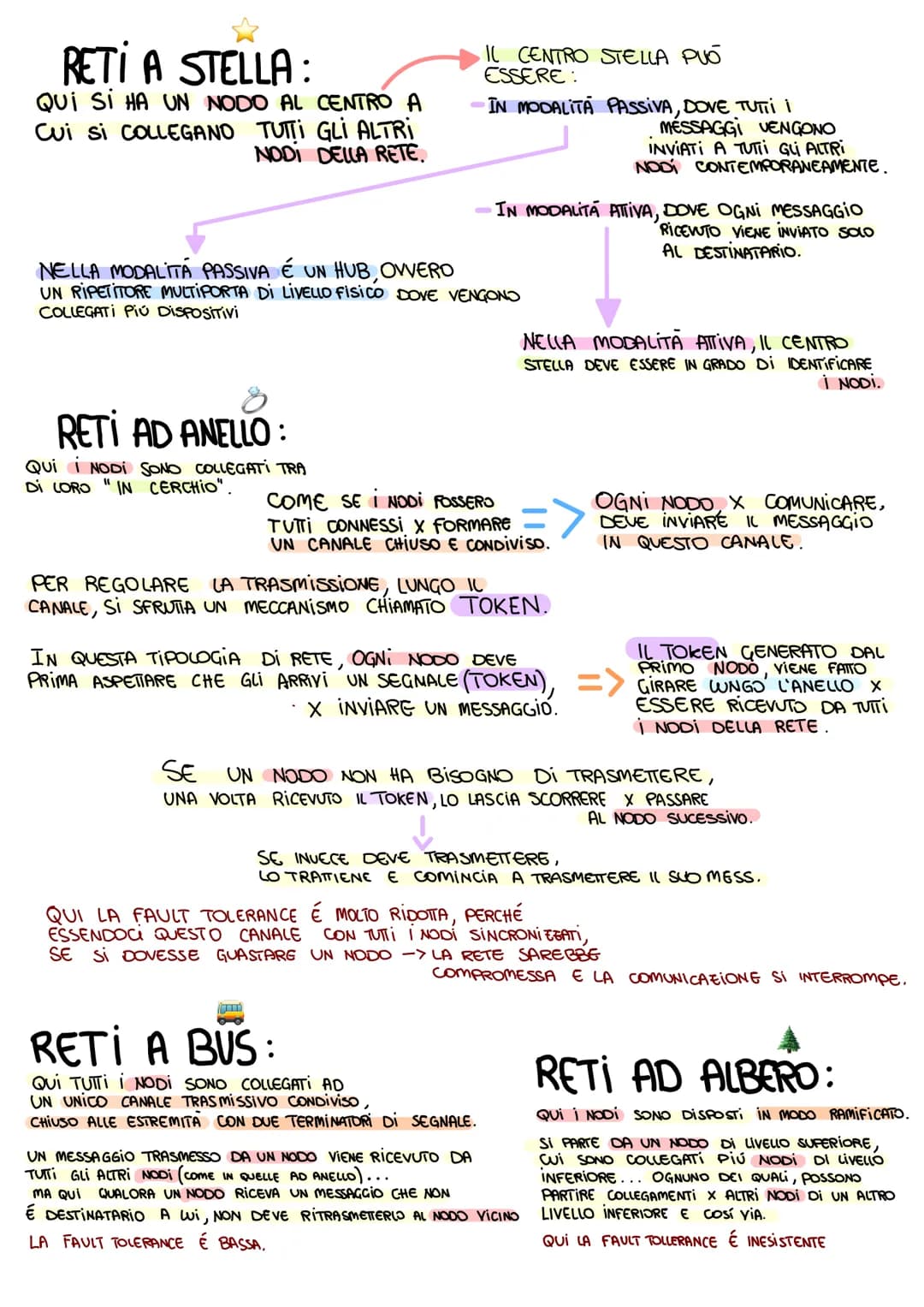
Topologie di Rete: Come si Collegano i Computer
La topologia descrive come sono disposti e collegati i nodi (computer) di una rete. Esistono connessioni fisiche (cavo diretto) e logiche (attraverso nodi intermedi) - come andare da A a C passando per B.
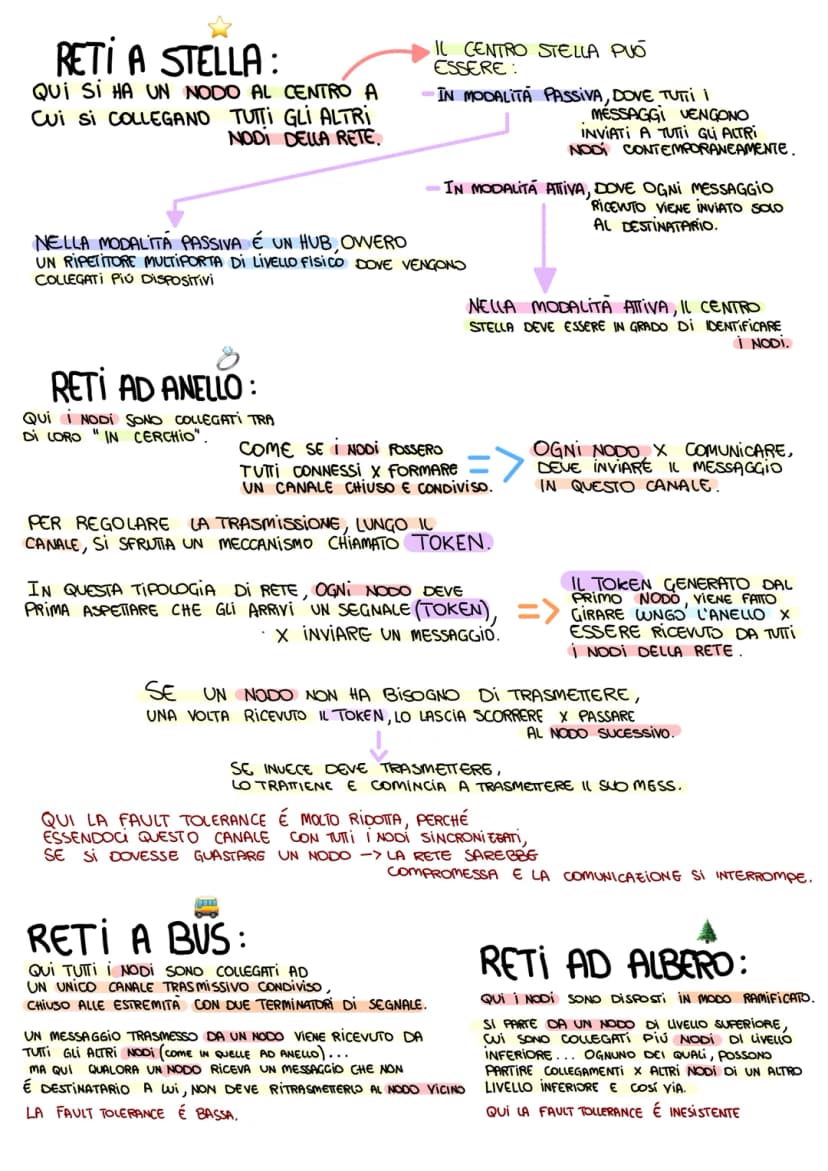
Reti a stella: un nodo centrale a cui si collegano tutti gli altri. Il centro può essere passivo (HUB che manda tutto a tutti) o attivo (switch che manda solo al destinatario giusto). Reti ad anello: i nodi formano un cerchio chiuso con un sistema token - solo chi ha il "gettone" può trasmettere.
Reti a bus: tutti i nodi collegati a un unico canale condiviso con terminatori alle estremità. Reti ad albero: struttura ramificata che parte da un nodo superiore. La fault tolerance (resistenza ai guasti) varia molto: alta nelle reti magliate, quasi inesistente in quelle ad anello o ad albero.
Trucco per ricordare: Stella = centro comando, Anello = giro di parola, Bus = autobus con fermate!
5
of 5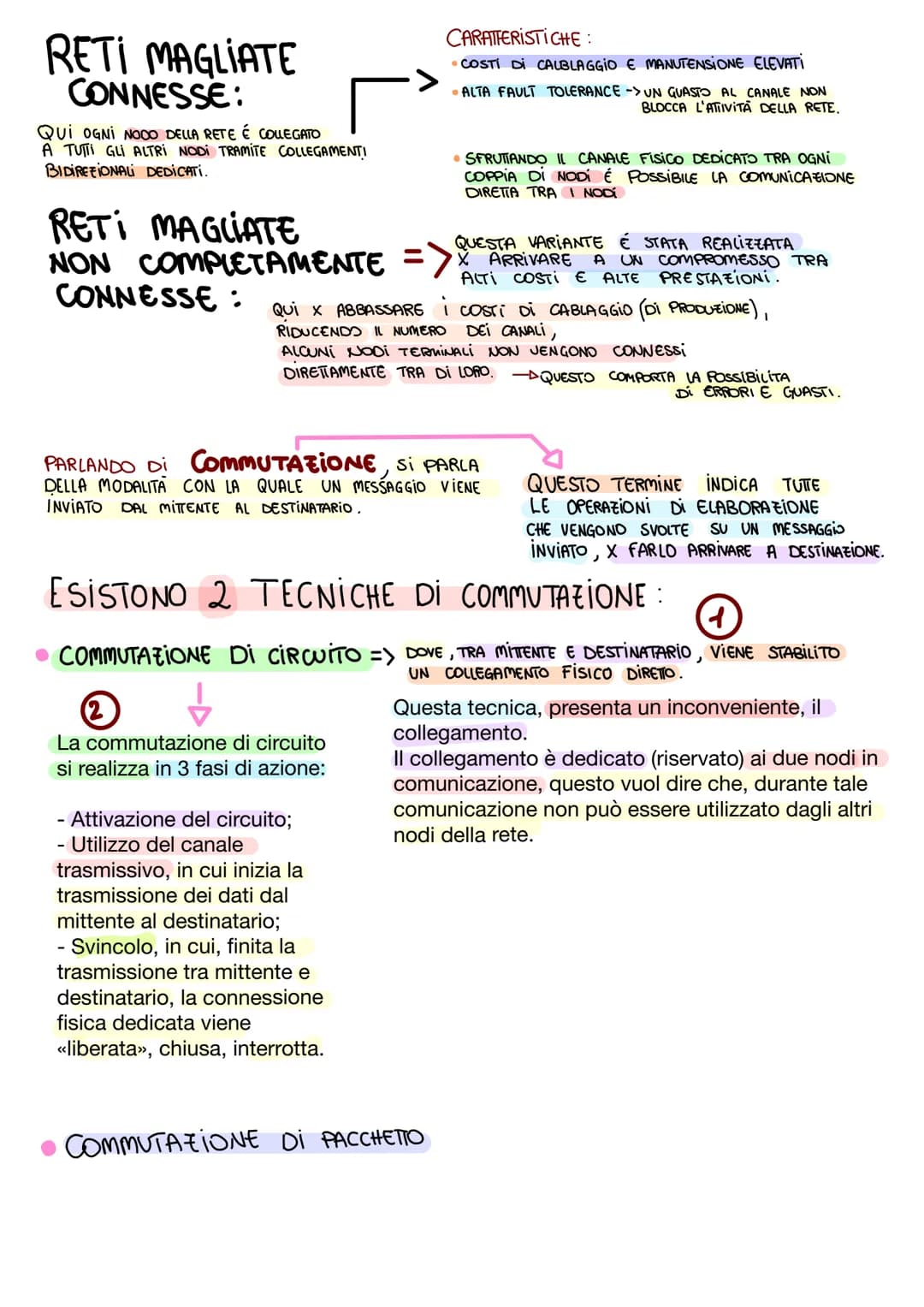
Reti Magliate e Tecniche di Commutazione
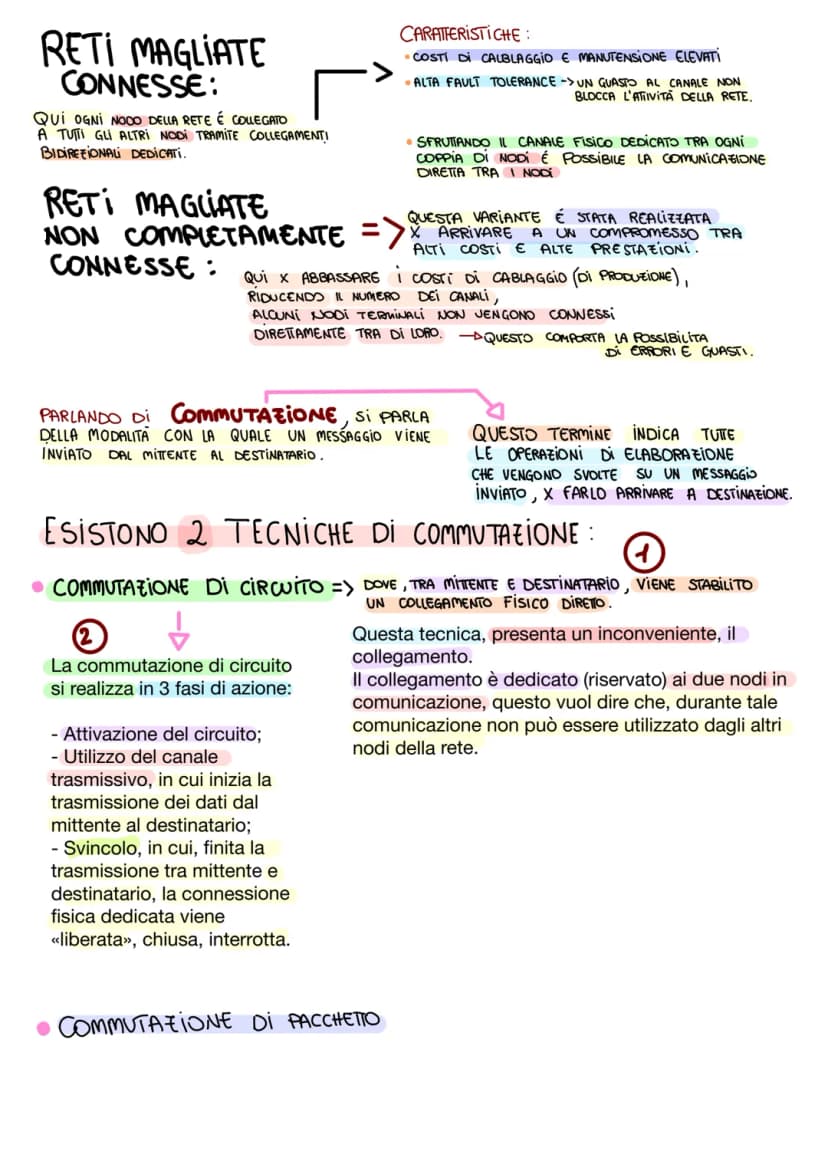
Le reti magliate offrono la massima affidabilità: ogni nodo è collegato a tutti gli altri (completamente connesse) o solo ad alcuni (non completamente connesse). Costano di più ma garantiscono alta fault tolerance - se un collegamento si rompe, ce ne sono altri disponibili.
La commutazione è il modo in cui un messaggio viaggia dal mittente al destinatario. La commutazione di circuito stabilisce un collegamento fisico dedicato in tre fasi: attivazione, utilizzo, svincolo. È come prenotare una linea telefonica - nessun altro può usarla durante la tua chiamata.
Esiste anche la commutazione di pacchetto (più efficiente) dove i dati viaggiano in piccoli pacchetti che trovano la strada migliore. Il problema della commutazione di circuito è che il collegamento rimane "occupato" anche quando non trasmetti attivamente.
Analogia utile: Commutazione di circuito = prenotare un taxi, commutazione di pacchetto = prendere l'autobus!
We thought you’d never ask...
What is the Knowunity AI companion?
Our AI companion is specifically built for the needs of students. Based on the millions of content pieces we have on the platform we can provide truly meaningful and relevant answers to students. But its not only about answers, the companion is even more about guiding students through their daily learning challenges, with personalised study plans, quizzes or content pieces in the chat and 100% personalisation based on the students skills and developments.
Where can I download the Knowunity app?
You can download the app in the Google Play Store and in the Apple App Store.
Is Knowunity really free of charge?
That's right! Enjoy free access to study content, connect with fellow students, and get instant help – all at your fingertips.
Similar Content
Most popular content: rete informatica
4Informaticareti informatiche
le reti informatiche, cosa sono, come funzionano e le sue caratteristiche
5ªl3,07662
Informaticale reti informatiche
i vari tipi di reti (con disegni)
1ªl2,15447
InformaticaLe Reti Informatiche
PPT sulle reti informatiche, con informazioni medio-specifiche (9 slide)
1ªl4,34890
Informaticareti di computer
architetture di rete networking hosting,housing e Claudio computing
4ªl2,46556
Most popular content in Informatica
9S
InformaticaStranger Things
Quanto Ne Sai Sulla Fantastica Serie Netflix Stranger Things??
1ªm6309
InformaticaSegnali integrativi
Appunti patente
3ªl2,51158
InformaticaDiagrammi di flusso
Appunti per ripasso dei diagrammi di flusso (flowchart); Introduzione ai blocchi, condizione e iterazioni (WHILE e DO WHILE);
1ªl2,27840
InformaticaProgrammazione in C
Appunti chiave per programmare in C
1ªl1,99570
Informaticail romanico
elementi del romantico
2ªm2,943100
InformaticaEXCEL
riferimenti, funzioni (SE, CONTA.SE, CONFRONTA, CERCA.VERT, SOMMA.SE, MAX e MIN, E), copia e incolla, riempimento automatico, subtotali
1ªl2,87384
InformaticaComposti chimici inorganici
Composti chimici inorganici + nomenclatura
1ªl1,27746
InformaticaInformatica 1
Primi argomenti di informatica della prima superiore, Architettura di VON NEUMANN, Hardware software, Il case e la scheda madre, Periferiche e schede e porte di comunicazione, l’unità centrale di elaborazione e la memoria centrale, la memoria RAM…..
1ªl69028
Informaticareti informatiche
le reti informatiche, cosa sono, come funzionano e le sue caratteristiche
5ªl3,07662
Most popular content
9 Italiano
Riassunto patente B
Riassunto patente B - appunti presi a lezione
5ªl29,242943
 Altro
AltroTeoria patente b
Tutti gli argomenti per la patente
1ªl21,138685
 Ed. civ.
Teoria patente di guida B: Segnali stradali
Segnali stradali di pericolo, luminosi, di prescrizione, di indicazione, temporanei, complementari, pannelli integrativi, segnaletica orizzontale, segnalazioni agenti del traffico, distanza di visibilità per l‘arresto, minima di sicurezza.
5ªl40,0421,645
 Filosofia
Aristotele
Aristotele: vita, metafisica, fisica, etica e politica, retorica e poetica
3ªl7,623216
ItalianoI promessi sposi
Riassunti completi di tutti i 38 capitoli dei Promessi sposi.
2ªl14,090314
AltroPATENTE
schemi per esame teorico della patente
Università22,067756
S
ItalianoSintesi finale di Analisi logica
Esercitazione completa di analisi logica su frasi articolate per consolidare la conoscenza di tutti i complementi.
3ªm5,5290
P
 Inglese
Present Simple vs Present Continuous
Develop the ability to choose correctly between the Present Simple for habits and the Present Continuous for ongoing actions.
3ªm4,2120
G
ItalianoGabriele D'Annunzio e l'Estetismo
Domande sull'ideale del superuomo, il panismo e la concezione dell'arte come valore assoluto in D'Annunzio.
4ªl2,6740
Can't find what you're looking for? Explore other subjects.
Students love us — and so will you.
4.6/5App Store
4.7/5Google Play
The app is very easy to use and well designed. I have found everything I was looking for so far and have been able to learn a lot from the presentations! I will definitely use the app for a class assignment! And of course it also helps a lot as an inspiration.
Stefan SiOS user
This app is really great. There are so many study notes and help [...]. My problem subject is French, for example, and the app has so many options for help. Thanks to this app, I have improved my French. I would recommend it to anyone.
Samantha KlichAndroid user
Wow, I am really amazed. I just tried the app because I've seen it advertised many times and was absolutely stunned. This app is THE HELP you want for school and above all, it offers so many things, such as workouts and fact sheets, which have been VERY helpful to me personally.
AnnaiOS user
Informatica1,961 views·Updated Jun 16, 2026·5 pagesReti Informatiche: Modelli Client/Server e Peer-to-Peer Spiegati Semplicemente
Valentina Crotti@valentina_crotti
L'evoluzione delle reti informatiche ha rivoluzionato il modo in cui comunichiamo e condividiamo informazioni. Dall'informatica tradizionale siamo passati alle ICT (Information Communication Technology), creando un mondo interconnesso dove computer e dispositivi collaborano costantemente.
1
of 5
Sign up to see the content. It's free!
- Access to all documents
- Improve your grades
- Join milions of students
Aspetti Evolutivi delle Reti e Modelli di Comunicazione
Oggi non parliamo più solo di informatica, ma di ICT - tutte quelle tecnologie che servono a conservare e trasmettere informazioni attraverso reti di computer. Da qui nasce la telematica, fusione perfetta tra telecomunicazioni e informatica.
Una rete è semplicemente un insieme di computer collegati tra loro per soddisfare le nostre esigenze quotidiane: condividere file, usare stampanti comuni, consultare database condivisi. Pensa a quando scarichi un file dal computer del tuo amico o stampi da una stampante di rete!
Esistono due modelli principali: Client/Server (dove alcuni computer fanno da "servitori" offrendo risorse) e Peer to Peer (dove tutti i computer sono sullo stesso livello). Nelle reti C/S la distinzione non è sempre netta - un computer può comportarsi da server per un servizio e da client per un altro.
Ricorda: La telematica è ovunque intorno a te - dal WiFi di casa ai social network!
2
of 5Sign up to see the content. It's free!
- Access to all documents
- Improve your grades
- Join milions of students
Comunicazione e Trasmissione Dati
Nelle reti Client/Server, la comunicazione avviene tramite messaggi che viaggiano come pacchetti di caratteri. Per facilitare la trasmissione, questi messaggi vengono spezzettati in pacchetti più piccoli - immagina di spedire una lettera lunga dividendola in più buste numerate!
Ogni pacchetto contiene tre elementi fondamentali: la parte del messaggio, l'indirizzo del destinatario e il numero d'ordine. Esistono due modi per eseguire i servizi: esecuzione lato client (il programma viene caricato sul tuo computer) o esecuzione lato server (il programma gira sul server remoto).
Nelle reti Peer to Peer, ogni computer si chiama nodo e funziona sia da client che da server. A volte c'è un server centrale che controlla il traffico per evitare rallentamenti - come un vigile che regola il traffico in una strada trafficata.
Curiosità: Quando fai file-sharing stai usando una rete peer to peer!
3
of 5Sign up to see the content. It's free!
- Access to all documents
- Improve your grades
- Join milions of students
Classificazione delle Reti per Estensione
Le reti si classificano in base alla distanza che coprono. Le LAN (Local Area Network) e WLAN (Wireless LAN) sono reti locali - la differenza sta nei cavi fisici versus collegamenti wireless. Pensale come la rete di casa tua o della scuola.
Le MAN (Metropolitan Area Network) coprono una città o più comuni limitrofi - come una rete che collega tutte le scuole di una provincia. Le WAN (Wide Area Network) arrivano a coprire intere nazioni, mentre Internet è la rete globale che connette tutto il pianeta.
Puoi collegare diversi tipi di rete tra loro usando i router - dispositivi che funzionano come "instradatori di messaggi". Per esempio, la tua LAN di casa si connette a Internet attraverso il router del tuo provider.
Pensa così: LAN = casa, MAN = città, WAN = nazione, Internet = mondo intero!
4
of 5Sign up to see the content. It's free!
- Access to all documents
- Improve your grades
- Join milions of students
Topologie di Rete: Come si Collegano i Computer
La topologia descrive come sono disposti e collegati i nodi (computer) di una rete. Esistono connessioni fisiche (cavo diretto) e logiche (attraverso nodi intermedi) - come andare da A a C passando per B.
Reti a stella: un nodo centrale a cui si collegano tutti gli altri. Il centro può essere passivo (HUB che manda tutto a tutti) o attivo (switch che manda solo al destinatario giusto). Reti ad anello: i nodi formano un cerchio chiuso con un sistema token - solo chi ha il "gettone" può trasmettere.
Reti a bus: tutti i nodi collegati a un unico canale condiviso con terminatori alle estremità. Reti ad albero: struttura ramificata che parte da un nodo superiore. La fault tolerance (resistenza ai guasti) varia molto: alta nelle reti magliate, quasi inesistente in quelle ad anello o ad albero.
Trucco per ricordare: Stella = centro comando, Anello = giro di parola, Bus = autobus con fermate!
5
of 5Sign up to see the content. It's free!
- Access to all documents
- Improve your grades
- Join milions of students
Reti Magliate e Tecniche di Commutazione
Le reti magliate offrono la massima affidabilità: ogni nodo è collegato a tutti gli altri (completamente connesse) o solo ad alcuni (non completamente connesse). Costano di più ma garantiscono alta fault tolerance - se un collegamento si rompe, ce ne sono altri disponibili.
La commutazione è il modo in cui un messaggio viaggia dal mittente al destinatario. La commutazione di circuito stabilisce un collegamento fisico dedicato in tre fasi: attivazione, utilizzo, svincolo. È come prenotare una linea telefonica - nessun altro può usarla durante la tua chiamata.
Esiste anche la commutazione di pacchetto (più efficiente) dove i dati viaggiano in piccoli pacchetti che trovano la strada migliore. Il problema della commutazione di circuito è che il collegamento rimane "occupato" anche quando non trasmetti attivamente.
Analogia utile: Commutazione di circuito = prenotare un taxi, commutazione di pacchetto = prendere l'autobus!
We thought you’d never ask...
What is the Knowunity AI companion?
Our AI companion is specifically built for the needs of students. Based on the millions of content pieces we have on the platform we can provide truly meaningful and relevant answers to students. But its not only about answers, the companion is even more about guiding students through their daily learning challenges, with personalised study plans, quizzes or content pieces in the chat and 100% personalisation based on the students skills and developments.
Where can I download the Knowunity app?
You can download the app in the Google Play Store and in the Apple App Store.
Is Knowunity really free of charge?
That's right! Enjoy free access to study content, connect with fellow students, and get instant help – all at your fingertips.
Similar Content
Most popular content: rete informatica
4Informaticareti informatiche
le reti informatiche, cosa sono, come funzionano e le sue caratteristiche
5ªl3,07662
Informaticale reti informatiche
i vari tipi di reti (con disegni)
1ªl2,15447
InformaticaLe Reti Informatiche
PPT sulle reti informatiche, con informazioni medio-specifiche (9 slide)
1ªl4,34890
Informaticareti di computer
architetture di rete networking hosting,housing e Claudio computing
4ªl2,46556
Most popular content in Informatica
9S
InformaticaStranger Things
Quanto Ne Sai Sulla Fantastica Serie Netflix Stranger Things??
1ªm6309
InformaticaSegnali integrativi
Appunti patente
3ªl2,51158
InformaticaDiagrammi di flusso
Appunti per ripasso dei diagrammi di flusso (flowchart); Introduzione ai blocchi, condizione e iterazioni (WHILE e DO WHILE);
1ªl2,27840
InformaticaProgrammazione in C
Appunti chiave per programmare in C
1ªl1,99570
Informaticail romanico
elementi del romantico
2ªm2,943100
InformaticaEXCEL
riferimenti, funzioni (SE, CONTA.SE, CONFRONTA, CERCA.VERT, SOMMA.SE, MAX e MIN, E), copia e incolla, riempimento automatico, subtotali
1ªl2,87384
InformaticaComposti chimici inorganici
Composti chimici inorganici + nomenclatura
1ªl1,27746
InformaticaInformatica 1
Primi argomenti di informatica della prima superiore, Architettura di VON NEUMANN, Hardware software, Il case e la scheda madre, Periferiche e schede e porte di comunicazione, l’unità centrale di elaborazione e la memoria centrale, la memoria RAM…..
1ªl69028
Informaticareti informatiche
le reti informatiche, cosa sono, come funzionano e le sue caratteristiche
5ªl3,07662
Most popular content
9ItalianoRiassunto patente B
Riassunto patente B - appunti presi a lezione
5ªl29,242943
AltroTeoria patente b
Tutti gli argomenti per la patente
1ªl21,138685
Ed. civ.Teoria patente di guida B: Segnali stradali
Segnali stradali di pericolo, luminosi, di prescrizione, di indicazione, temporanei, complementari, pannelli integrativi, segnaletica orizzontale, segnalazioni agenti del traffico, distanza di visibilità per l‘arresto, minima di sicurezza.
5ªl40,0421,645
FilosofiaAristotele
Aristotele: vita, metafisica, fisica, etica e politica, retorica e poetica
3ªl7,623216
ItalianoI promessi sposi
Riassunti completi di tutti i 38 capitoli dei Promessi sposi.
2ªl14,090314
AltroPATENTE
schemi per esame teorico della patente
Università22,067756
S
ItalianoSintesi finale di Analisi logica
Esercitazione completa di analisi logica su frasi articolate per consolidare la conoscenza di tutti i complementi.
3ªm5,5290
P
InglesePresent Simple vs Present Continuous
Develop the ability to choose correctly between the Present Simple for habits and the Present Continuous for ongoing actions.
3ªm4,2120
G
ItalianoGabriele D'Annunzio e l'Estetismo
Domande sull'ideale del superuomo, il panismo e la concezione dell'arte come valore assoluto in D'Annunzio.
4ªl2,6740
Can't find what you're looking for? Explore other subjects.
Students love us — and so will you.
4.6/5App Store
4.7/5Google Play
The app is very easy to use and well designed. I have found everything I was looking for so far and have been able to learn a lot from the presentations! I will definitely use the app for a class assignment! And of course it also helps a lot as an inspiration.
Stefan SiOS user
This app is really great. There are so many study notes and help [...]. My problem subject is French, for example, and the app has so many options for help. Thanks to this app, I have improved my French. I would recommend it to anyone.
Samantha KlichAndroid user
Wow, I am really amazed. I just tried the app because I've seen it advertised many times and was absolutely stunned. This app is THE HELP you want for school and above all, it offers so many things, such as workouts and fact sheets, which have been VERY helpful to me personally.
AnnaiOS user